SMS Consent & Opt-In Flow
How CueUp customers opt in to SMS notifications
A2P 10DLC CTA verification page · Last updated May 14, 2026
This page documents the two ways customers opt in to receive SMS messages from CueUp. Both opt-in flows happen inside the CueUp mobile app and require the customer to affirmatively tick an unchecked consent checkbox before any SMS is sent. Real device screenshots and the verbatim disclosure text for each flow are shown below.
Flow 1 — Account Sign-Up
When a new customer creates a CueUp account in the mobile app, the sign-up screen includes a phone-number field and — directly below it — an unchecked SMS consent checkbox. The customer must affirmatively tick the checkbox to opt in. The full disclosure is displayed adjacent to the checkbox, including links to the Privacy Policy and Terms of Service.
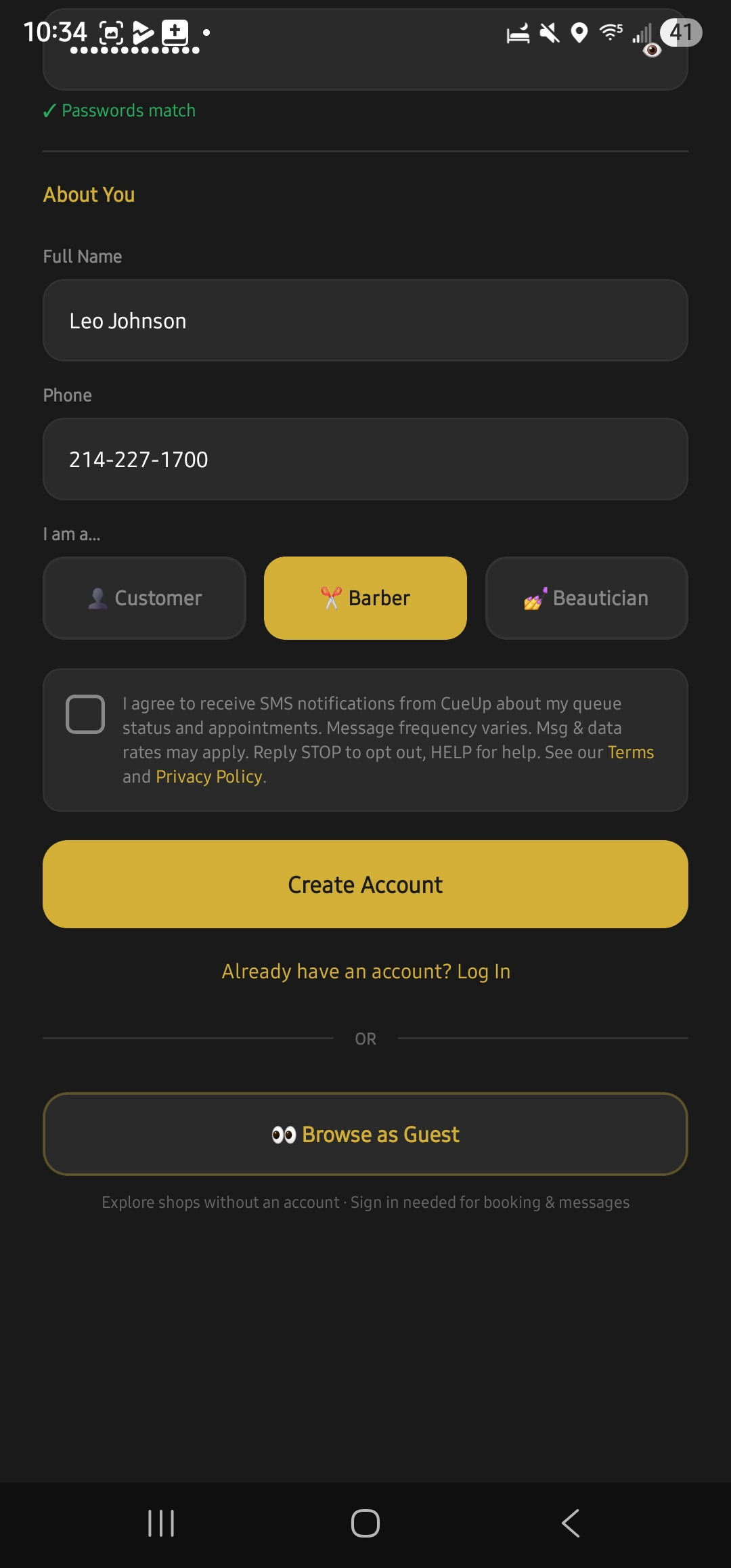
The customer enters their name, email, password, and phone number, picks their role (Customer / Barber / Beautician), and then must tick the consent checkbox before tapping "Create Account."
Flow 2 — In-Shop Kiosk
Participating barbershops and salons can place a tablet at the front desk running CueUp in "Kiosk Mode." Walk-in customers join the queue without downloading the app. The kiosk sign-in screen includes the same unchecked SMS consent checkbox, presented immediately below the phone-number field. The checkbox is unchecked by default and the customer must affirmatively tick it to receive SMS.
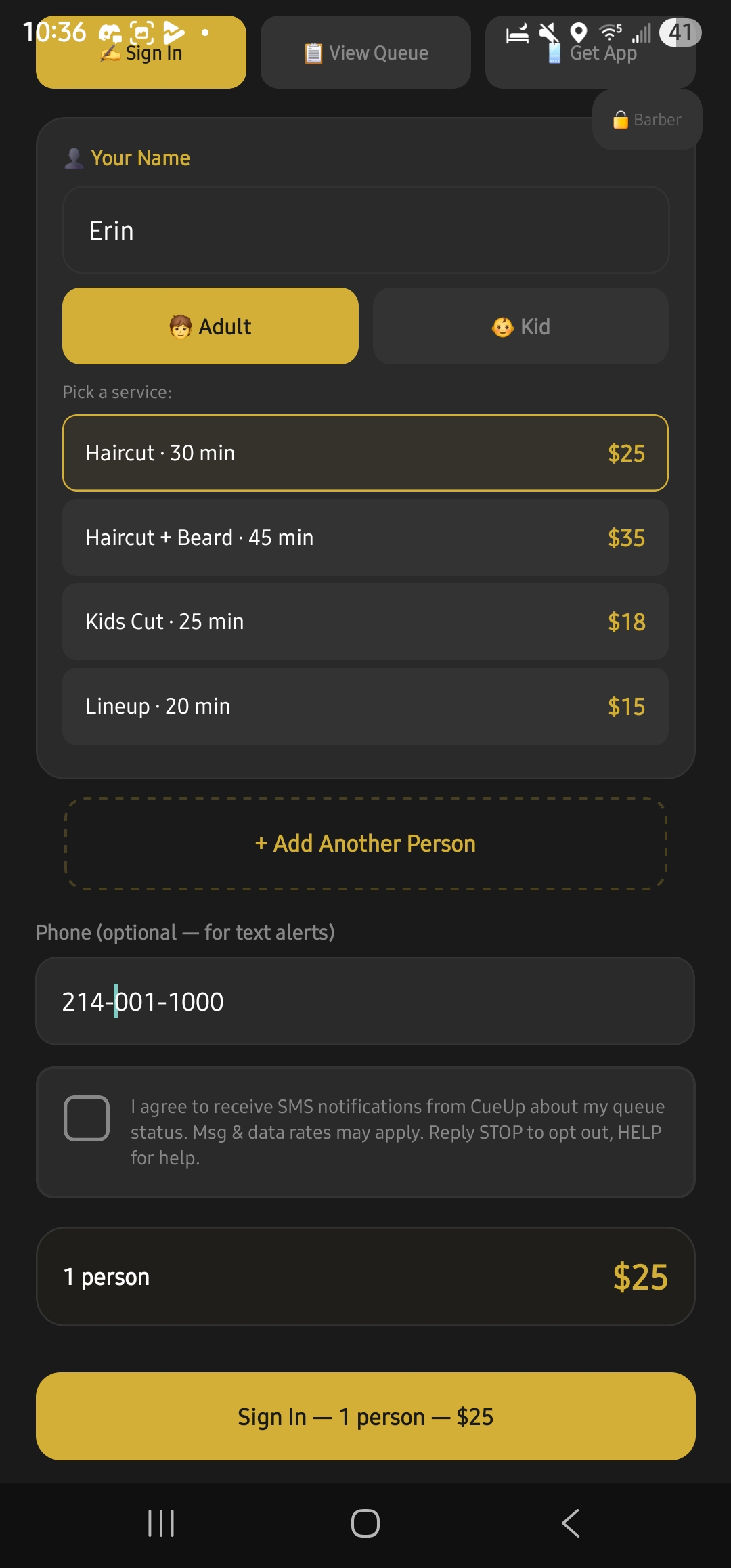
The customer enters their name, picks Adult or Kid, selects a service, optionally adds additional people, enters a phone number, and then must tick the consent checkbox before tapping "Sign In."
Sample messages
Customers who opt in receive transactional SMS related only to their queue position and appointments. CueUp does not send marketing, promotional, or solicitation messages. Typical wording:
Message frequency varies by customer activity. A typical visit results in 1 to 5 messages.
Keyword handling
All opt-out and help keywords are processed automatically by our SMS webhook within seconds of receipt:
| Reply | What happens |
|---|---|
| STOP (also STOPALL, UNSUBSCRIBE, CANCEL, END, QUIT) | Customer is added to our opt-out table. They receive one confirmation reply ("You've been unsubscribed from CueUp SMS…") and no further messages. The opt-out is enforced at the server level — no message can be sent to a phone on this list. |
| HELP (also INFO) | Customer receives: "CueUp: queue + appointment alerts for your barbershop/salon. Reply STOP to opt out. Msg & data rates may apply. Support: support@cueup.app" |
| START (also YES, UNSTOP) | Previously opted-out customer is re-enrolled. Confirmation reply: "You're opted back in to CueUp SMS. Reply STOP to opt out anytime." |
Customers can also disable SMS at any time from within the CueUp app under Notification Preferences → SMS.
Privacy
We do not share customer mobile phone numbers or SMS opt-in data with third parties or affiliates for marketing or promotional purposes. Mobile information is used only to deliver the SMS notifications the customer has opted in to receive, and is shared only with our SMS infrastructure provider (Twilio) for the sole purpose of delivering those messages.
Full details: Privacy Policy · SMS Program Terms